Smart locks are revolutionizing home security, offering convenience and peace of mind, especially for seniors. With the ability to control access remotely and eliminate the need for traditional keys, these devices are becoming essential for enhancing safety at home. However, choosing the right smart lock can be challenging due to the variety of features and technologies available. This guide focuses on smart locks that are easy to install and use, making them ideal for seniors who value both security and simplicity.
Smart Locks Reviews
1 eufy Security Smart Lock C220
Best For: Versatile Access
With six different ways to unlock, this smart lock offers flexibility and convenience, making it perfect for seniors who value ease of use.

Multiple unlocking methods
Long battery life
Requires frequent app updates
Why We Like It
The eufy Security Smart Lock C220 is known for its versatile unlocking options, including fingerprint, app, and voice commands. This flexibility is ideal for seniors who may have difficulty with traditional keys. The lock’s long battery life means less frequent maintenance, and its integration with the eufy ecosystem allows for seamless smart home control. However, users should be prepared for regular app updates to maintain optimal functionality.
- 6 Ways to Unlock: Fingerprint, app, keypad, physical key, Apple Watch, voice assistant
- 8 Months Battery Life
- Built-in Wi-Fi for remote control
- BHMA Grade 3 Certified
2 Philips WiFi Keypad Deadbolt
Best For: Smart Home Integration
Perfect for tech-savvy seniors, this lock integrates seamlessly with voice assistants and smart home systems, offering both convenience and security.
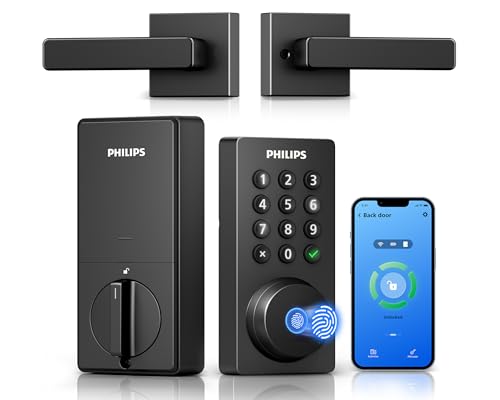
Compatible with Alexa and Google Assistant
Flexible passcode options
May require frequent battery changes
Why We Like It
The Philips WiFi Keypad Deadbolt is ideal for seniors who are comfortable with technology and want a lock that integrates with their smart home setup. Its compatibility with Alexa and Google Assistant allows for easy voice control, while the flexible passcode options provide added convenience for managing access. However, the lock’s reliance on batteries means users should keep an eye on battery levels to avoid unexpected lockouts.
- Voice Assistant Compatible
- Versatile Passcode Options
- Auto-Lock Feature
- 6-Month Battery Life
3 Sifely WiFi Fingerprint Smart Deadbolt
Best For: Remote Management
This lock is perfect for seniors who want to manage their home security remotely, offering app control and multiple access options.

Remote app management
Multiple access methods
Complex setup for non-tech users
Why We Like It
The Sifely WiFi Fingerprint Smart Deadbolt is designed for seniors who want to manage their home security from anywhere. With its app control, users can lock or unlock doors remotely, making it ideal for those who travel or have multiple properties. The lock offers multiple access methods, including fingerprint and keypad, providing flexibility and security. However, the initial setup might be challenging for those less familiar with technology.
- Built-in WiFi, No Gateway Required
- 6 Convenient Access Options
- Remote Guest Codes for Rentals
- Alexa and Google Assistant Compatible
4 Veise VE017 Fingerprint Smart Door Lock
Best For: Advanced Security
This lock provides enhanced security features, making it suitable for seniors who prioritize safety and want robust protection.

Advanced fingerprint recognition
Smart user management
Requires separate gateway for full features
Why We Like It
The Veise VE017 Fingerprint Smart Door Lock offers advanced security features that are perfect for seniors who want extra peace of mind. Its fingerprint recognition is highly accurate, and the smart user management system allows for detailed access control. However, to unlock its full potential, a separate gateway is required, which might be an additional consideration for some users.
- Smart User Management
- 8-in-1 Smart Unlock & Locking
- Self-learning AI Fingerprint Recognition
- ≥12 Months Battery Life
5 Yamiry Smart Door Handle Lock
Best For: Easy Installation
Designed for straightforward installation, this lock is ideal for seniors who want a quick and hassle-free setup.

Quick and easy installation
Multiple unlocking options
Limited advanced features
Why We Like It
The Yamiry Smart Door Handle Lock is perfect for seniors who prefer a simple installation process. Its design allows for a quick setup without the need for professional help, and it offers multiple unlocking options, including fingerprint and keypad. While it lacks some advanced features found in other models, its ease of use and installation make it a great choice for those who want a straightforward solution.
- 6-In-1 Versatility
- Quick and Effortless Installation
- Convenient Access Management via the App
- Ideal for Landlords and Property Managers
How to Choose the Right Smart Lock
Ease of Use Features for Seniors
When selecting a smart lock for seniors, ease of use is paramount. Look for locks with intuitive interfaces, such as touchscreens or voice controls, which can simplify the process of locking and unlocking doors. Features like auto-locking and remote access via smartphone apps can also enhance convenience and security.
Security Features Specific to Senior Needs
Security is a top priority for seniors. Choose smart locks that offer robust security features, such as biometric fingerprint access, anti-peeping passcodes, and real-time alerts for unauthorized access attempts. These features help ensure that seniors feel safe and secure in their homes.
Compatibility with Senior-Friendly Home Automation Systems
For seniors who use home automation systems, compatibility is key. Ensure the smart lock you choose can integrate seamlessly with existing systems like Alexa or Google Assistant, allowing for easy voice control and automation of home security tasks.
Installation Process and Requirements
Consider the installation process when choosing a smart lock for seniors. Opt for models that offer DIY installation with minimal tools required. Many smart locks are designed to fit standard door sizes and can be installed in minutes, making them accessible for seniors who may not have technical expertise.
Frequently Asked Questions
What features make a smart lock suitable for seniors?
Smart locks suitable for seniors often include features like easy-to-use interfaces, voice control, and remote access via smartphone apps. These features enhance convenience and security, making them ideal for elderly users.
Are there specific smart locks recommended for seniors?
Yes, smart locks like the eufy Security Smart Lock C220 and Philips WiFi Keypad Deadbolt are recommended for seniors due to their ease of use, versatile access options, and integration with smart home systems.
How do smart locks enhance security for seniors?
Smart locks enhance security by offering features such as biometric access, real-time alerts, and remote monitoring. These features help seniors maintain control over their home security and respond quickly to potential threats.
Choosing the right smart lock can significantly enhance home security and convenience for seniors. By focusing on ease of use, security features, and compatibility with home automation systems, seniors can find a smart lock that meets their needs and provides peace of mind.