
Managing medications can be a daunting task, especially for seniors juggling multiple prescriptions. With the rise of digital health tools, senior-friendly apps for medication management have become invaluable. These apps not only help in organizing and reminding users about their medications but also ensure adherence, which is crucial for maintaining health and independence in seniors.
However, choosing the right app can be challenging. Many apps claim to offer comprehensive solutions, but not all are tailored to the specific needs of older adults. This guide focuses on apps that are intuitive, feature-rich, and specifically designed to address the challenges seniors face, such as navigation difficulties and visibility issues.
Medication Management App Reviews
1Zoksi Bluetooth Pill Dispenser
Best For: Comprehensive Management
This dispenser is ideal for seniors who need a robust system to manage multiple medications with ease and security.

Why We Like It
The Zoksi Bluetooth Pill Dispenser is known for its comprehensive approach to medication management. With 31 slots and customizable daily doses, it’s perfect for seniors managing complex medication schedules. The triple reminder system—voice, light, and app notifications—ensures no dose is missed. Its fingerprint lock adds a layer of security, making it ideal for households with children. However, its advanced features might be overwhelming for those not comfortable with technology.
- 31 slots for flexible scheduling
- Triple reminder system
- Fingerprint lock for security
2Ideerfit 42-Day Pill Dispenser
Best For: Remote Monitoring
Perfect for caregivers who need to monitor medication adherence from afar, ensuring peace of mind.
Why We Like It
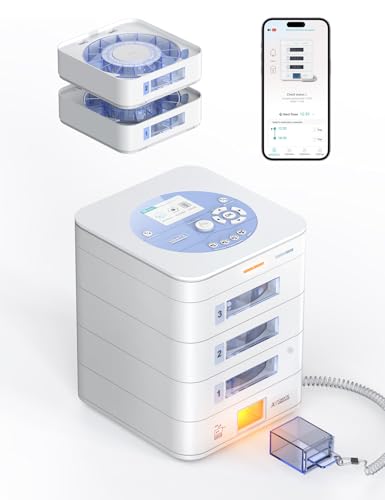
The Ideerfit 42-Day Pill Dispenser is a standout choice for caregivers who need to manage medications remotely. Its app allows for real-time monitoring and adjustments, ensuring that seniors are taking their medications as prescribed. The flexible dosing options make it adaptable to various medication schedules. The secure digital lock prevents unauthorized access, providing peace of mind. However, it’s not designed for use in institutional settings, which limits its application to home use.
- Remote monitoring via app
- Flexible dosing options
- Secure digital lock
3LiveFine Auto WiFi Pill Dispenser
Best For: Caregiver Coordination
Ideal for families and caregivers who need to coordinate medication schedules and ensure adherence remotely.

Why We Like It
The LiveFine Auto WiFi Pill Dispenser is a great choice for families and caregivers who need to coordinate medication schedules. Its WiFi-enabled app allows for seamless updates and reminders, ensuring that everyone is on the same page. The clear lid provides easy visual monitoring, and customizable alarms cater to individual needs. However, it requires a stable WiFi connection to function optimally, which might be a limitation for some users.
- WiFi-enabled app for caregivers
- Clear lid for easy monitoring
- Customizable alarm settings
How to Choose the Right Medication Management App

Features of Senior-Friendly Apps
When selecting a medication management app for seniors, look for features that enhance usability, such as large fonts, intuitive navigation, and voice commands. These features help overcome common challenges like poor visibility and navigation difficulties.
Free vs. Paid Apps
Free apps often provide basic functionalities like reminders and scheduling, while paid versions may offer advanced features such as detailed tracking and caregiver notifications. Consider your specific needs and budget when choosing between free and paid options.
Integration with Healthcare Providers
Some apps offer integration with healthcare providers, allowing for seamless communication and updates on medication adherence. This feature can be particularly beneficial for seniors with complex medical needs.
Security and privacy are important considerations when choosing a medication management app for seniors. Many seniors and their caregivers are concerned about the safety of personal health information. Apps like Medisafe and CareClinic prioritize data protection by using encryption and secure login methods to safeguard users’ information. It’s crucial to select an app that complies with healthcare privacy regulations, such as HIPAA in the United States, to ensure that sensitive data is handled appropriately.
User reviews can also provide valuable insights into the usability and effectiveness of these apps. Seniors and their caregivers often highlight the ease of setup and the clarity of reminders as critical factors in their reviews. Apps that receive high praise typically offer comprehensive customer support, which can be a deciding factor for those who are less tech-savvy. Reading user feedback can help potential users gauge how well an app performs in real-world scenarios, particularly for seniors who may face unique challenges in managing their medications.
Frequently Asked Questions
What are the top medication management apps for seniors?
Top apps include Medisafe, Dosecast, and My PillBox, known for their senior-friendly features and ease of use.
How do these apps cater to the specific needs of older adults?
These apps offer features like large text, voice commands, and simple navigation to accommodate seniors’ needs.
Are there any free apps available for medication management?
Yes, there are free apps available that offer basic functionalities, though paid versions may provide more comprehensive features.
Conclusion
Choosing the right medication management app is crucial for seniors to maintain their health and independence. By focusing on apps that offer senior-specific features, you can ensure that medication adherence is both manageable and effective. Whether you opt for a free or paid app, the key is to find one that fits your lifestyle and needs.